
Your first steps in Screebits
Find your way from a new account to a saved strategy, a simulation and metric research.
First strategy · Step 2 of 10
Screebits lets you describe a rule as a visual Flow, save the strategy, simulate a saved version against historical data, and research market metrics in Quant Hub. These are separate actions. Your first useful milestone is a saved Flow you can reopen, so you can learn the editor without spending a Backtest allowance or needing a trading result.
Start with a result
If you are new, your first goal is a strategy you can save and reopen. Follow the BTC/USD RSI quickstart. It uses a Blueprint and does not need a paid action or a Backtest submission. You need a signed-in account and room for the new strategy in your plan.
The docs are public. Opening Screebits from them takes you to the product, where sign-in may be required. Product help links open documentation in a new tab so you can keep your editing workspace open.
Sign in and reach Home
On the sign-in screen, choose an enabled method. With Sign in with email (Magic Link), enter your email, submit the request, then open the message and follow the link; the verification screen lets you request another link if necessary. With Continue with Google, continue through that provider when its button is enabled. If the product identifies a method already associated with your address, use that method. New accounts can be asked to enter a display name before Home becomes available. No strategy is created by signing in.
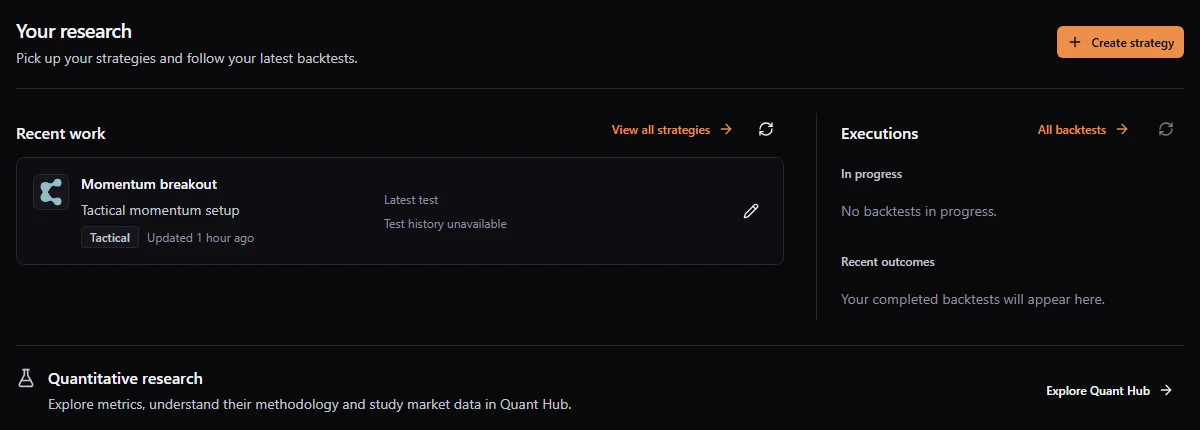
On Home, look for Recent work if you already have strategies. A new account instead shows a first-strategy path and Quick actions. Create strategy takes you to the creation flow; Open strategies takes you to the full library. If recent work fails to refresh, use its retry rather than assuming your strategies were deleted. See workspace and account for sign-in and recovery details.
Build and verify your first Flow
- Open Blueprints, find BTC/USD RSI Momentum Alert, inspect its detail and choose Use Blueprint. Enter a distinct name and choose Create strategy. Alternatively, Strategies → New strategy opens the same form, where you can explore Blueprints or start from scratch. A copy uses one strategy slot.
- In the editor, find the five roles: a market event starts the control path, a data source supplies bars, an indicator calculates RSI, a Condition compares the value with a threshold, and an Alert handles the matching outcome. A control connection determines whether a step runs; a data connection supplies what value it reads. Read the connection guide if a line or port is unfamiliar.
- Select the Condition and change the threshold from 55 to 60 as shown in the quickstart. Check the Inspector's configured value and the validation messages. This changes a rule, not market history. Fix blocking issues before relying on the graph.
- Choose Save strategy and wait for saved confirmation. Return to Strategies, search by its name, open its detail and choose Edit in editor. Verify that the Condition still shows 60. This reopen check is your first completed result; no signal, trade or gain is promised.
If saving fails or the editor reports a conflict, keep the tab open and use save and conflict recovery. If the strategy list says No strategies match, clear its filters; No strategies yet means there is no saved strategy in that account.
Understand the workspace
A strategy, a Backtest and a Quant Hub chart are different objects. Saving a strategy does not launch a simulation. A historical run uses its saved strategy version; later edits do not rewrite that result. Exploring a chart does not place an order.
Your next cycle is deliberate: save the rule → configure a Backtest → wait for completion → read its context and metrics → revise the current strategy. A Backtest on an alert-only Flow can complete without trades because the Flow sends an alert rather than an order. That is a useful observation about the graph, not proof of performance. Quant Hub research can inform a later change, but opening a standalone chart does not add a metric to the strategy.
Choose a path
- I want to build a rule: complete the quickstart, then learn control and data connections.
- I want to test my idea: review Backtest configuration, submit when ready and use Backtest Center.
- I want to understand a result: begin with reading results, then compare or export.
- I want to research a metric: start with Quant Hub. Reading a standalone metric does not imply that it can be used as a Flow node.
- I cannot find a command: check workspace and access, then the Flow troubleshooting guide.
Learn the vocabulary
A node is one step or data operation. A bar summarizes market data for an interval; a timeframe defines that interval. A snapshot records a strategy version. A run is one Backtest execution. Start with the glossary when these concepts are unfamiliar.
In the RSI example, a 1-minute bar summarizes one minute of the selected market feed, while RSI 14 uses a window of bars to express recent upward versus downward movement on a 0–100 scale. A threshold such as 60 is a comparison value, not an order price. A higher threshold can reduce how often the Condition matches; it does not guarantee a better strategy.
Recognize availability
Plan, account role, feature status and available data can affect what you see. A disabled control should explain its requirement. Coming soon describes an unavailable feature, not something that an upgrade necessarily enables. Exact quotas and prices belong to the current product and billing screens.
If you cannot create a strategy, open Settings → Usage to check available strategy slots. If Run backtest is disabled, read its validation, date or quota reason before trying again. If a Quant Hub chart is locked, the metric may be visible in the catalog but unavailable to your plan or role. A loading or stale state is different from an empty result; retry the relevant panel and wait for confirmation.
Related documentation
- Build an RSI Momentum AlertCreate the Starter strategy, change its threshold, validate it, save it, and reopen it.
- Use Backtest CenterFind runs, follow progress, understand statuses and manage saved results.
- Explore Quant HubFind a market metric, understand access and read its meaning before using its chart.