
Read a Backtest result
Understand the saved context, performance, risk, trades and missing data before drawing conclusions.
Backtest operations · Step 2 of 3
Check the context first
Open a completed run from Backtest Center. Read the strategy and version, mode, period, initial capital, instruments and execution assumptions. This is the configuration recorded for that run. Editing the current strategy does not change the historical result.
Treat the results as a simulation of those conditions. A high return is not sufficient evidence that a strategy works reliably. Costs, sample size, risk and changes between runs matter.
Navigate the report
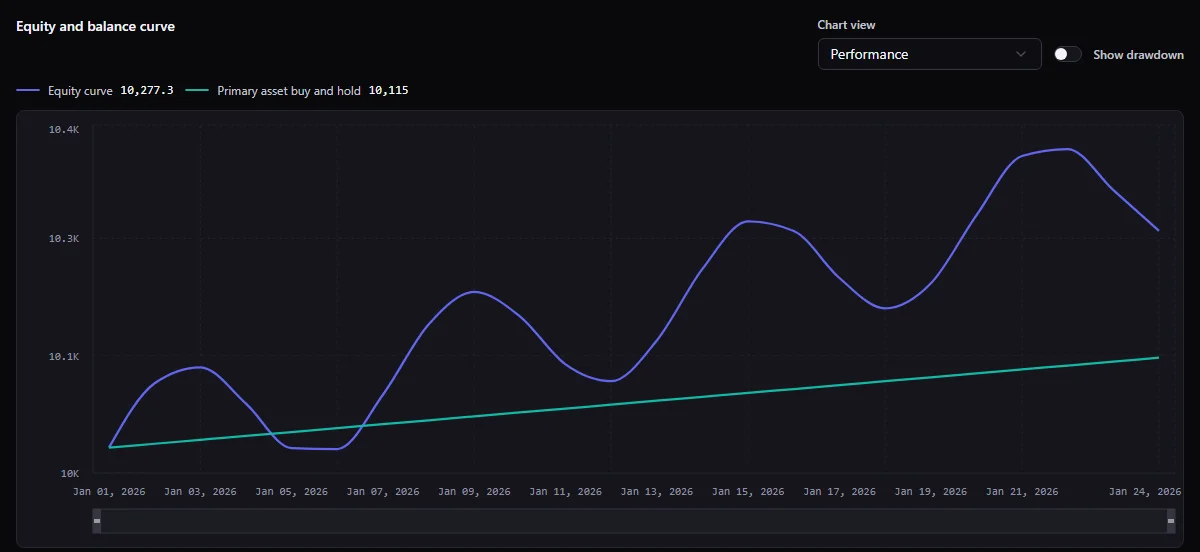
- Overview shows summary performance and capital or equity, drawdown and monthly returns. Portfolio results can also show weights and leverage.
- Metrics provides performance and risk detail. Tactical breakdowns can distinguish all, long and short trades; Portfolio includes allocation-oriented analysis. Read the unit and availability of each value.
- Trades in Tactical follows execution and position records. Rebalances in Portfolio shows allocation changes. Chart and table views complement each other.
- Debug shows recorded node events and eligible replay actions. See debug and replay.
A section can be absent or unavailable when that run did not produce the required data. Result tables may be paginated or bounded: read totals and truncation notices before interpreting visible rows as the whole result.
Understand the main measures
Use the metric descriptions and units in the result for the exact meaning. Missing, not applicable, insufficient data and unsupported calculations are not zero. An alert-only strategy may complete without trades; it cannot establish order execution or profitability.
Work through one trade before trusting a total
The following numbers are an arithmetic illustration, not a Screebits run or a forecast. Suppose one unit has a reference entry price of 100 and reference exit price of 110. The difference before execution friction is 10. If the simulated fills are 101 to buy and 109 to sell, the difference using actual fills is 8. A modeled commission of 1 on each side reduces it to 6 before any other modeled items. The price friction is already in the fills: subtracting it again from 8 would double count it.
In a real report, inspect the run's recorded fills, quantities, fees, currency, cost assumptions and any other applicable charges. Do not assume the UI's “gross” label uses reference prices: use its definition and the displayed unit. A percentage return also needs a denominator, such as the capital basis defined for that metric. This single favorable trade says nothing about drawdown, sample size or repeatability.
Separate zero trades from missing results
A completed run of the RSI Alert starter can legitimately have zero trades: its graph contains Alert but no Order. First confirm that the run completed and the tested version is the one you expected. Then inspect the report and debug evidence for arrivals, comparisons and alerts if debug data is available. If an Order graph also has zero trades, check whether the control path reached Order, whether a Condition selected No Match, whether data and warmup were available, and whether an order was denied or never submitted. These are different explanations; a 0 trade count does not identify which one occurred. A missing Trades panel or expired detail is a data-availability state, not proof that no order event existed.
Understand data availability
A retained summary can remain readable after detailed result data expires. Saved bookmarks do not stop expiry. Price candles, detailed artifacts, static node summaries and full debug replay have different requirements; one available chart does not prove all data is retained.
When a panel shows expired, pending, unavailable or a load error, follow that panel’s explanation. Retry a temporary transport error. Expired data cannot be recovered by repeatedly refreshing. An unavailable value is not evidence of a zero return or an event that never happened.
Use debug to explain a decision
Open Debug, then filter the recorded timeline by all events, errors or snapshots. Use pagination to inspect later events. A failed run’s reason and support reference help identify the problem; avoid sharing private identifiers publicly.
Full replay requires an eligible plan, debug enabled for that execution and available debug data. It opens a historical graph in read-only mode. A static overlay or summary can be useful even when full replay is unavailable.
Open tested version opens the snapshot used by this execution in read-only mode. Edit current strategy opens the current authoring workspace. They can refer to different content. Strategy overview returns to the strategy’s evidence; the contextual back link returns to the history or strategy you came from.
Decide the next experiment
Write down what you changed and which outcome you want to examine. Return to the current strategy, create a checkpoint when useful, make the change and save. A new Backtest creates a separate result. Use comparison to review differences in both configuration and outcomes.
Related documentation
- Use Backtest CenterFind runs, follow progress, understand statuses and manage saved results.
- Compare and export BacktestsCompare compatible runs, keep a private report and review a share card before sharing.
- Debug and replay a BacktestInspect an available debug payload in the read-only Replay Dock and follow events, data, variables, and diagnostics.