
Compare and export Backtests
Compare compatible runs, keep a private report and review a share card before sharing.
Backtest operations · Step 3 of 3
Use this guide after you can read one result. Comparison answers what changed between two recorded executions; export keeps an appropriate copy of the evidence. You need at least two eligible completed results for comparison. Report and share actions appear according to each result's status and available data.
Prepare two results
Start from a completed Backtest with comparison available. Choose another eligible completed run of the same strategy mode. Runs may come from the same strategy, different saved versions or different strategies. Tactical and Portfolio are not directly selectable as a cross-mode pair.
For a useful experiment, keep the strategy version, period, instruments, capital and execution assumptions the same, and change one input for the second run. Record the one change before opening Compare. If you compare unlike strategies or periods, the page can still show numbers, but it cannot isolate the effect of your change.
Read the comparison
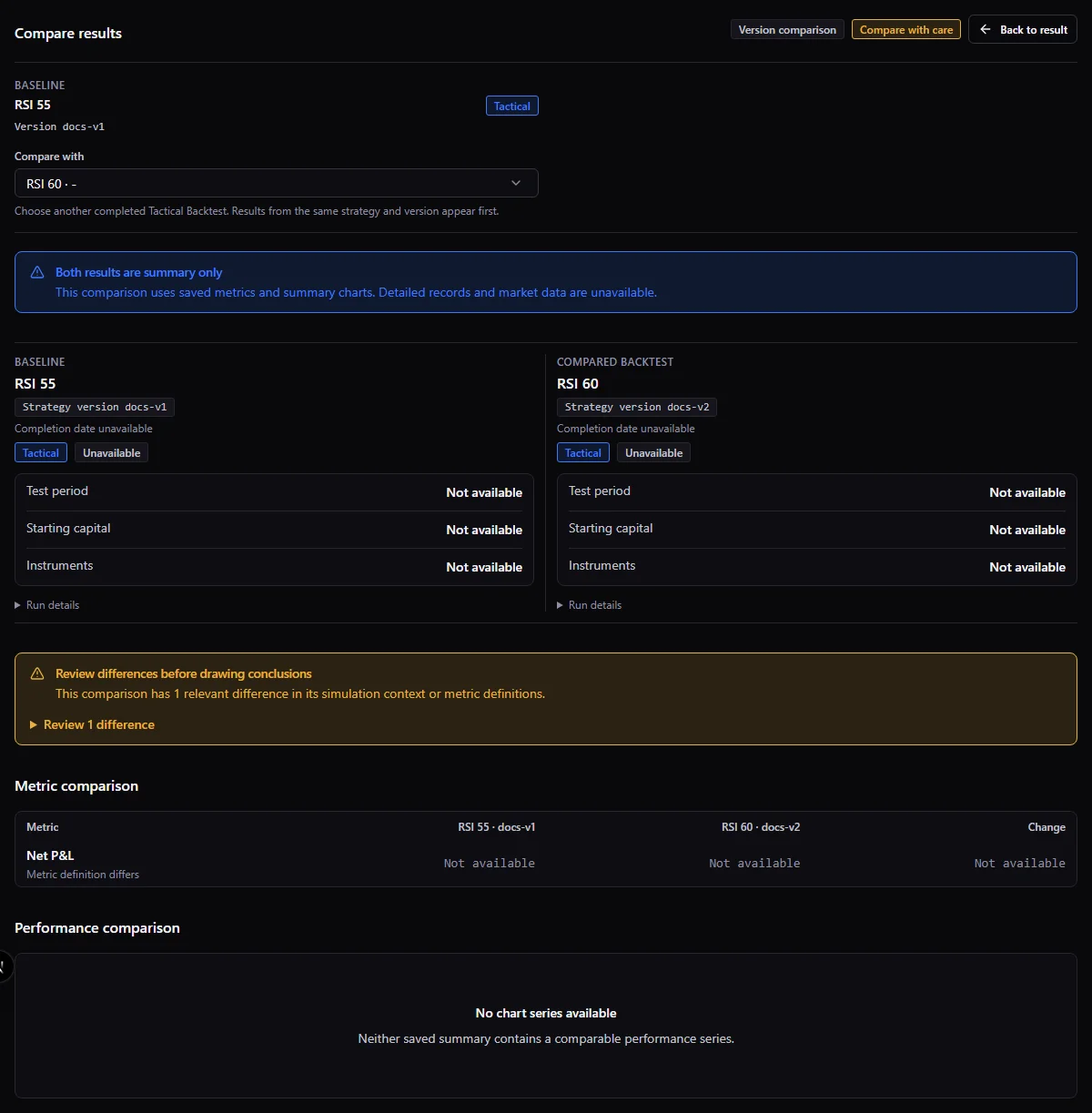
Open Compare and use its selector. Identify the baseline and compared result by strategy name, version and completion date. The selector prioritizes runs of the baseline strategy and separates other strategies.
Read compatibility notices before the deltas. Period, capital, currency, benchmark, costs, instruments, timeframe, leverage and calculation versions can differ. The comparison can remain available with caveats; that does not make the experiments equivalent. A missing value has a reason and is not zero. A positive delta is not automatically an improvement: more costs and more return have different meanings.
On narrow screens, switch between baseline and compared charts. Use the data table when a plotted point is difficult to inspect. Summary comparisons can remain available after detailed payload expiry.
Worked reading: imagine two completed Tactical runs over the same saved version and dates. Run A models a 0.1% commission rate and run B 0.2%; the other inputs are held constant. If gross return is unchanged but net return is lower in B, inspect the displayed cost breakdown before attributing the difference to the strategy signal. Check the units: a change from 6% to 5.6% is a 0.4 percentage-point difference, not a 0.4% relative change. These figures are illustrative, not a claim about Screebits output or a trading outcome.
Download a report
On a completed result, open the actions menu and choose Download PDF report when available. The report is a concise summary of the run and its configuration, not a copy of every screen or the full debug timeline. Keep the original run context with the file.
Machine exports are separate JSON/CSV actions where offered; use them for structured analysis rather than expecting the PDF to contain all records. A failed run may offer a failure report instead of a performance report. Available exports depend on the result and retained data. An error or corrupt artifact is not an empty successful export; follow its retry or unavailable state.
A summary-only result can still support summary-based comparison or a PDF. It does not regain expired full-detail records through export. Keep the run identifier privately with the file so you can identify the original execution later.
Review before sharing
Use Share on an eligible completed result to open the preview. Check strategy name, dates, return and any absolute amounts. Absolute amounts are opt-in on the share card. Then choose the available sharing action or download the PNG.
Previewing and downloading do not automatically create a public report link. The actual sharing action sends the chosen artifact through the destination you select. Review it first and share only information you intend to disclose. A negative result retains its loss sign; do not crop away material context when presenting it.
If comparison or export is unavailable
- No comparison candidate: check for a second completed run of the same mode. A failed, canceled, active or deleted run is not a performance comparator.
- Compatibility warning: compare version, dates, capital, instruments and assumptions before interpreting a delta. Record the caveat alongside any conclusion.
- Unavailable metric or chart: read its availability reason. Missing data, an inapplicable metric and a computed zero have different meanings; use the accessible summary table when detailed charts are no longer retained.
- Report generation error: retry the action if the page offers it. A failed download or corrupt file is not a valid blank report. Keep the original run instead of deleting it to troubleshoot an export.
- No Share action: sharing is for eligible completed results. A failure report is not a share card.
Keep the limits with the result
A report is a historical simulation with specific assumptions. Preserve costs, date range and caveats alongside any performance figure. See responsible use. Saving a bookmark does not extend retention; an exported summary does not preserve full replay.
Related documentation
- Use Backtest CenterFind runs, follow progress, understand statuses and manage saved results.
- Read a Backtest resultUnderstand the saved context, performance, risk, trades and missing data before drawing conclusions.
- Backtests and responsible useInterpret simulated results with appropriate limits and avoid treating them as predictions or advice.