
Run a Backtest
Save a ready graph, review Backtest inputs and costs, then submit the simulation.
First strategy · Step 10 of 10
A Backtest simulates a saved version of your strategy over historical data. It does not deploy the strategy or place live orders. Start with a graph that has no blocking validation errors.
Open the Backtest flow
Choose Run backtest in the editor toolbar. Opening this dialog does not save the graph or submit a run. You can inspect the settings and choose Cancel. The final submission saves a pre-backtest snapshot when required; a save failure blocks submission.
A disabled action can indicate validation errors, missing data, plan capacity, loading or an unresolved save conflict. Read the reason and fix it before retrying.
You can also launch from a saved strategy’s overview, or choose New backtest in Backtest Center and select a saved strategy. Both use the same configuration and server validation. Use Edit current strategy when you intend to change the graph; opening a tested version inspects historical content in read-only mode.
Configure the simulation
- In Period, open Date range. Review the available dates for this strategy, then select the start and end dates. The initial selection uses the latest 30 complete UTC days available, or the whole window if shorter. These may not be the most recent calendar dates.
- Set Starting capital (USD) within the limits displayed. New runs use USD; there is no base-currency selector.
- Review Execution model. Defaults depend on strategy mode and instruments. Expand Customize assumptions only when you want to change them.
- Review Advanced for debug options available to your plan. Benchmark is marked Coming soon and cannot currently be configured for a new run.
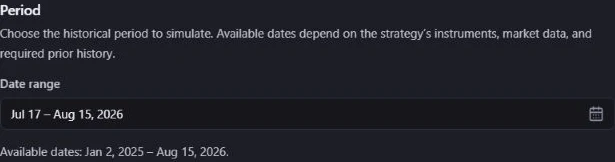
The available window depends on instruments, required feeds and prior history needed to initialize indicators (warm-up). Dates outside it are disabled. If an edited range becomes unavailable, choose a new one: the product does not silently shorten it. Limits refresh on reopening and the exact range is checked again on submission. A temporary date or execution-model failure has its own retry action.
Understand the assumptions
Commission is the fee charged by the model; slippage models a difference from the reference fill price. Review their units before editing: a field labeled Rate (%) expects a percentage, so 0.1 means 0.1%, not 10%. Minimum commission is a separate floor when supported.
The advanced execution settings may expose spread, borrowing cost, market impact and fill assumptions. Only enabled choices are available for the current context. Immediate, next-bar and limit models describe different simulation assumptions; they are not a promise about real execution. Reset to platform defaults restores the proposed cost settings. These values belong to this Backtest configuration, separately from Flow Settings.
Debug data must be requested before the run when the option is available. Enabling a plan later does not recreate unrecorded events. Full replay also requires an eligible plan and unexpired detailed data.
Submit and follow the run
Choose Run backtest in the dialog only when ready to use your run allowance. Wait for the request to finish; do not repeatedly submit while it is pending. A successful request creates an execution that you can follow in Backtest Center.
A completed run counts toward the allowance. Failed or canceled runs release their reserved allowance once the final status is confirmed. A cancellation request is not yet a canceled run. Exact capacity is determined by the current plan and account state.
If submission fails, read the error and any support reference. The strategy save may have succeeded before a later submission failure: check the saved state and Backtest history before trying again. Do not assume a run exists without confirmation. Keep support references private when sharing screenshots.
Interpret carefully
Read the result in context, including dates, costs and unavailable metrics. A Backtest is a historical simulation and does not predict future performance. See responsible use.
Related documentation
- Use Backtest CenterFind runs, follow progress, understand statuses and manage saved results.
- Read a Backtest resultUnderstand the saved context, performance, risk, trades and missing data before drawing conclusions.
- Debug and replay a BacktestInspect an available debug payload in the read-only Replay Dock and follow events, data, variables, and diagnostics.