
Use Backtest Center
Find runs, follow progress, understand statuses and manage saved results.
Backtest operations · Step 1 of 3
Backtest Center keeps each simulation separate from the strategy you edit today. You need a signed-in account and a saved strategy to launch a new run; you can also use this guide when you already have a historical run. Your goal here is to locate one execution, distinguish its progress from its final result, and decide whether to read, save, compare or remove it.
Start from a strategy
Open Backtest Center from the workspace sidebar. Choose New backtest, search for a saved strategy, select it and choose Configure backtest. Selecting a strategy does not submit an execution. Review the shared launch dialog as described in Run a Backtest. A Backtest is a separate historical execution; it does not change the strategy into a deployed system.
If the strategy selector is empty, clear its search. If there are still no eligible strategies, return to Strategies and save a graph first. If a run action is disabled, read its reason: validation, plan capacity, available historical dates or an unresolved save can block submission. Do not repeatedly submit a pending request.
Find a run
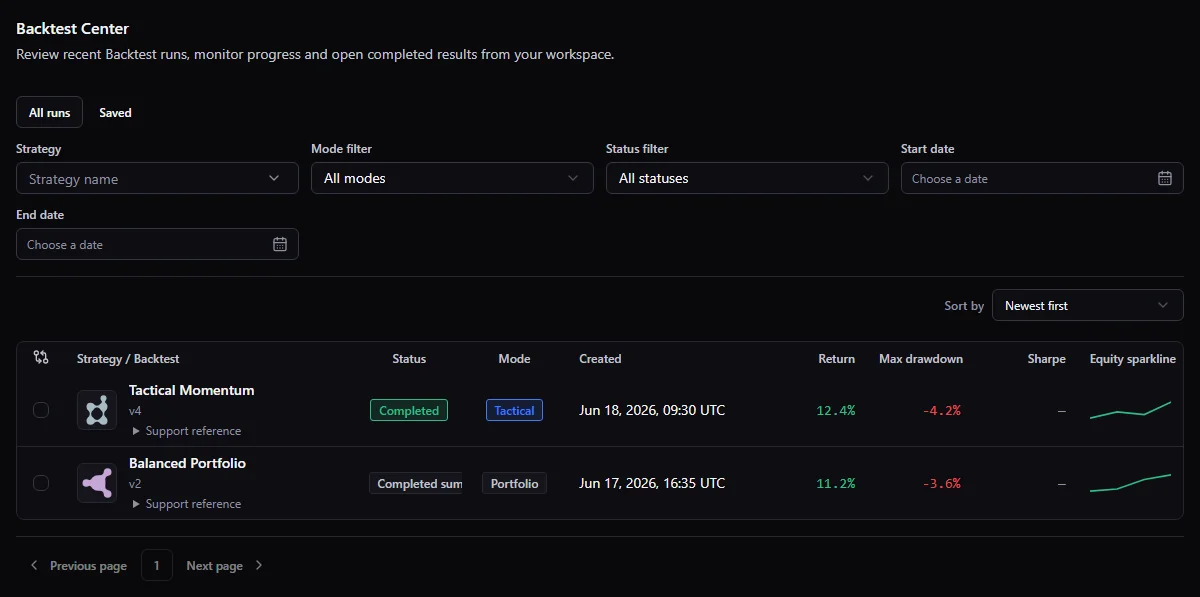
Use strategy, mode, status, execution-date and sorting controls to narrow history. All runs and Saved show the same history with different bookmark filters. Rows distinguish when the run was created from the simulated period, and align return, drawdown and Sharpe. Open the support-reference disclosure to copy the full run identifier. Check active filters when a known run seems missing and clear them before concluding that it was deleted. Use pagination to continue beyond the visible page. The strategy name belongs to the historical execution; renaming the strategy later does not rewrite that identity.
The Backtests tab inside a strategy uses these same controls and actions for that strategy. Its active executions are also limited to that strategy. Contextual return links preserve the history filters, page and comparison selection.
For example, suppose you ran version A of “RSI test” yesterday and version B today. Search for the strategy, choose Completed, and inspect the creation date and tested version on both rows. A run created today can simulate an older market period than yesterday's run. Opening the tested version is a read-only view of that execution's graph; Edit current strategy opens the latest working graph instead. Use the full run identifier from the support-reference disclosure only when you need to identify a particular execution.
Follow an execution
Active executions appear above history and remain visible independently of its filters. Open an active item to inspect its phase and progress. Queued or unknown progress may have no percentage or estimated completion time. A network error means the latest update could not be obtained; it does not by itself mean the execution failed.
A cancellation request has its own pending state. Wait for the final status: a run can finish while cancellation is being processed. If a terminal status appears before its result summary is ready, wait for the record to settle rather than using missing result actions as evidence of deletion.
Save a result for later
Use Add to saved on an eligible completed or failed result. Saved searches the whole history, not just the loaded page. Removing a bookmark leaves the run in history.
Saving is a bookmark: it does not extend detailed-data retention or preserve replay indefinitely. Summary and detailed-data availability are separate. Download an available report when you need a durable copy of a summary.
Think of the retained data in three layers. The summary supports the historical row and available summary charts or metrics. The full result supports detailed records when retained. Debug replay needs a separate recorded debug payload, an eligible plan and unexpired data. A summary-only run is still a historical result, but a bookmark cannot restore its detail or debug events.
Cancel or delete
Cancel run requests that an active execution stop. Confirm intentionally, then wait: the final outcome may already be completed or failed if it won the race. Failed and confirmed canceled runs release their reserved quota; completed runs remain counted.
Delete removes a historical Backtest from the user-facing history after two confirmation steps. Detailed payload and replay become unrecoverable. Removing a strategy does not automatically remove its old Backtests; any related-run cleanup is a separate confirmation flow. Deletion is not a way to renew a completed-run allowance.
Recover from an empty list or error
- No runs yet: save a strategy and launch one through New backtest; merely configuring the dialog does not create a row.
- A known run is missing: clear search, status, date and Saved filters, then check later pages and the strategy's Backtests tab. A saved bookmark is a view of history, not a separate copy.
- Progress cannot load: retry the local status request. Do not infer failure or resubmit until the final status is known.
- Completed row with limited detail: check its summary-only or retention message. Use the available summary and report; expired detail and replay do not reappear after refresh.
- Failed run: read the redacted reason and keep the support reference if assistance is needed. It has no invented performance metrics or trade history.
Continue
Open Read results before drawing conclusions, then Compare and export. If no run exists, use a saved example strategy as your starting point.
Related documentation
- Run a BacktestSave a ready graph, review Backtest inputs and costs, then submit the simulation.
- Read a Backtest resultUnderstand the saved context, performance, risk, trades and missing data before drawing conclusions.
- Compare and export BacktestsCompare compatible runs, keep a private report and review a share card before sharing.